Introduction
In software engineering, architecture is not only about organizing folders or choosing frameworks. Architecture is also about deciding where the business rules live, how they interact with the outside world, and how easily we can test them without depending on databases, user interfaces, external APIs, files, or infrastructure.
BlueZoneNet is an example application that explores that idea in a very practical way. It is a .NET implementation of the BlueZone parking example, originally created in Java by Juan Manuel Garrido de Paz as part of his Hexagonal Architecture implementation guide (https://jmgarridopaz.github.io/content/hexagonalarchitecture-ig/intro.html).
The application domain is intentionally simple: car drivers can remotely pay for parking in regulated city zones, while parking inspectors can check whether a car is illegally parked. Behind this small domain there is a clear architectural purpose: to show how business logic can be placed at the center of the system and protected from technological details such as web pages, payment mechanisms, repositories, and test doubles.
The original Hexagonal Architecture guide emphasizes that the goal is to allow users, scripts, tests, or other applications to drive the application in isolation from real-world devices such as databases, files, servers, or external applications . BlueZoneNet follows that same principle, but using .NET, ASP.NET Core, Razor Pages, NUnit, Reqnroll, and a project structure that maps ports and adapters into C# projects. You can find the .NET repository at https://github.com/AlexisHenriquez/bluezonenet.
Business Context
BlueZoneNet models a regulated parking system. A car driver wants to park a car in a city zone and pay remotely instead of using coins in a physical parking meter. A parking inspector wants to verify whether a parked car has a valid ticket for the rate associated with that zone.
The repository describes two primary user groups: car drivers and parking inspectors. Car drivers use a Web UI to query available rates and purchase parking tickets. Parking inspectors use a terminal or CLI to check whether a car is illegally parked. The repository also identifies three driven actors required by the application: a rate repository, a ticket repository, and a payment service.
This separation is important because the application does not start by thinking about databases, web screens, or APIs. It starts by thinking about actors and goals:
- The car driver wants to park a car.
- The parking inspector wants to check a car.
- The application needs rates to calculate parking duration.
- The application needs ticket storage to persist and retrieve tickets.
- The application needs a payment service to charge the customer.
This is the first architectural lesson of BlueZoneNet: the domain drives the structure.
Development Environment
The BlueZoneNet repository is implemented with modern .NET tooling. Development environment is: .NET SDK 10, ASP.NET Core 10, Visual Studio Code, Cucumber extension for VS Code, Windows 11, NUnit 4 for TDD, and Reqnroll.NUnit 3 for BDD.
At solution level, the repository is divided into seven projects:
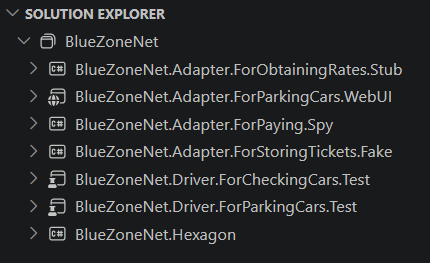
This is not an accidental naming convention. The names are part of the design. When a project is called Hexagon, it contains the core. When a project is called Adapter, it represents a technical implementation that connects an external actor to a port. When a project is called Driver, it represents something that drives the application from the outside, such as an automated test suite.
The Hexagon Project
The BlueZoneNet.Hexagon project is the center of the system. Its project file targets .NET 10, enables implicit usings and nullable reference types, and defines folders for factories and ports. The folder structure explicitly separates driven ports and driving ports.
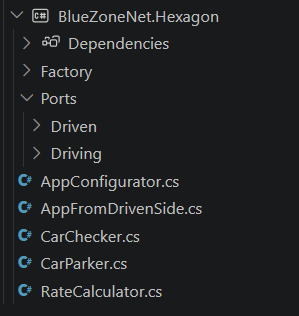
The important part is that this project does not depend on the Web UI project, the payment spy project, the fake ticket repository, or the rate stub. This is consistent with the dependency rule explained in the original implementation guide: the hexagon module contains the business logic and should be decoupled from technologies and adapters.
In BlueZoneNet, the hexagon exposes driving ports and depends on driven ports.
Driving ports
A driving port represents an entry point into the application. It is used by an external actor that wants the application to do something.
BlueZoneNet defines the IForParkingCars driving port. This port exposes three operations:
Dictionary<string, Rate> GetAllRatesByName();string PurchaseTicket(PurchaseTicketRequest purchaseTicketRequest);Ticket? GetTicket(string ticketCode);
This interface allows the driver side to query rates, purchase a ticket, and retrieve a ticket by code.
The second driving port is IForCheckingCars, which exposes the operation:
bool IllegallyParkedCar(DateTime clock, string carPlate, string rateName);
This operation checks whether a car has no valid ticket for a rate at the current date-time.
Driven ports
Driven ports represent what the application needs from the outside world.
The rate port, IForObtainingRates, allows the hexagon to find all rates, find a rate by name, add rates, check existence, and empty the rate source.
The ticket storage port, IForStoringTickets, allows the hexagon to generate ticket codes, find tickets, store tickets, query tickets by car and rate, delete tickets, check existence, configure the next code, and retrieve the next available code.
The payment port, IForPaying, allows the hexagon to perform a payment, inspect the last payment request, and configure a simulated payment error percentage.
This is one of the most valuable implementation details in BlueZoneNet: the hexagon does not know if rates come from a file, memory, database, API, or stub. It does not know if tickets are stored in a SQL database, a fake repository, or an in-memory list. It does not know whether payment is performed by Stripe, a bank gateway, or a spy adapter. It only knows ports.
The Domain Data
The implementation keeps the model intentionally small.
A Rate has a name and an amount per hour. Its ToString() method returns a readable representation such as a rate name and its hourly cost in euros.
A Ticket contains the ticket code, car plate, rate name, starting date-time, ending date-time, and price. The constructor allows the business logic to create a complete parking ticket after payment and duration calculation.
A PurchaseTicketRequest contains the data needed to purchase a ticket: car plate, rate name, current clock value, amount, and payment card.
A PayRequest contains the ticket code, payment card, and amount to be charged.
The model is simple, but that simplicity is useful. It lets us focus on the architectural idea rather than on accidental complexity.
Implementing the Car Parking Use Case
The main implementation of the parking use case is the CarParker class. This class implements the IForParkingCars driving port and receives three dependencies through its constructor:
IForObtainingRates rateProviderIForStoringTickets ticketStoreIForPaying paymentService
These dependencies are all driven ports. Therefore, CarParker does not depend on concrete adapters. It depends only on abstractions defined inside the hexagon.
The GetAllRatesByName() method asks the rate provider for all rates, iterates over them, and builds a dictionary indexed by rate name. This is the data that the Web UI later uses to show the available rates.
The PurchaseTicket() method is the core business flow:
- Ask the ticket store for the next ticket code.
- Build a payment request using the ticket code, card, and amount.
- Call the payment service.
- Find the selected rate.
- Calculate the ending date-time based on the paid amount.
- Create a ticket.
- Store the ticket.
- Return the ticket code.
The sequence is interesting because it shows how the hexagon coordinates multiple driven actors while keeping the business flow readable. The payment service is called through IForPaying. The rate information is obtained through IForObtainingRates. The ticket is persisted through IForStoringTickets.
The calculation itself is delegated to RateCalculator. Given a starting date-time and an amount of money, it calculates the number of parking minutes with the formula:
minutes = (amount * 60.0) / amountPerHour
If the rate is null, the method simply returns the original starting date-time; otherwise, it adds the calculated minutes to the starting time.
This is a small but clear example of business logic living inside the application core.
Implementing the Car Checking Use Case
The CarChecker class implements the IForCheckingCars driving port. It depends only on IForStoringTickets because the checking use case only needs to inspect ticket storage.
The method IllegallyParkedCar() follows a simple rule:
A car is illegally parked if there are no tickets for the car and rate,
or if the latest ticket ending date-time is before the current date-time.
The class asks the ticket store for tickets ordered by ending date-time descending. If the list is null or empty, the method returns true. If tickets exist, it compares the current date-time with the latest ending date-time. When the current date-time is greater than the latest ending date-time, the car is considered illegally parked.
This implementation is a good example of how a use case can be expressed without UI concerns, storage details, or infrastructure code.
Adapter Projects
BlueZoneNet separates the adapter implementations into different projects.
The adapter projects for rates, tickets, and payment all reference the hexagon project, not the other way around. Their projects depend on BlueZoneNet.Hexagon and also include post-build targets that copy their generated DLLs and PDBs into the Web UI output folder .
This copying mechanism supports runtime discovery. The Web UI project can load BlueZoneNet assemblies from its output directory and register implementations dynamically.
From an architectural point of view, this is the .NET version of the configurable dependency idea: the core defines what it needs; adapters provide implementations; startup composition wires them together.
The Web UI Adapter
The Web UI project is implemented as an ASP.NET Core Razor Pages application. Its project file targets .NET 10, uses the Web SDK, references Scrutor, and depends on the hexagon project.
The most important file is Program.cs. It scans the application base directory for assemblies whose path contains BlueZoneNet, loads them, and registers classes from the adapter and hexagon namespaces as implemented interfaces with singleton lifetime.
This means the Web UI does not manually instantiate CarParker, rate adapters, ticket adapters, or payment adapters. Instead, it lets dependency injection compose the system.
The Web UI registers Razor Pages, configures the ASP.NET Core pipeline, maps static assets, maps Razor Pages, and runs the application.
The Home page
The home page is simple and communicates the purpose of the application: BlueZoneNet is a Hexagonal Architecture implementation example that allows remote payment for parking cars in regulated city zones.
The layout adds navigation to the home page and the “Park a car” page.
The Park Car page
The ParkCarModel receives IForParkingCars through constructor injection. On HTTP GET, it calls GetAllRatesByName() and stores the result in the Rates property.
The corresponding Razor page renders a form that asks for:
- Car plate
- Rate
- Amount
- Payment card
The rate dropdown is populated from the Rates dictionary returned by the hexagon.
This is the driving adapter in action: the Web UI does not implement business rules. It only collects user input and calls the driving port.
The Purchase Ticket page
When the form is submitted, the PurchaseTicketModel builds a PurchaseTicketRequest using the posted car plate, rate name, amount, payment card, and the current date-time. Then it calls _carParker.PurchaseTicket() and stores the returned ticket code.
The Razor page displays a confirmation message and posts the ticket code to the GetTicket page so the user can view ticket details.
The Get Ticket page
The GetTicketModel receives the ticket code, calls GetTicket() on the IForParkingCars port, and then retrieves the rate information from GetAllRatesByName() using the ticket rate name.
The page displays the ticket code, car plate, rate, starting date-time, ending date-time, and price.
This completes the web flow:
- Home
- Park a car
- Purchase ticket
- View ticket details
Testing Strategy
BlueZoneNet includes two driver test projects:
- BlueZoneNet.Driver.ForParkingCars.Test
- BlueZoneNet.Driver.ForCheckingCars.Test
The parking test project uses NUnit, NUnit3TestAdapter, Microsoft.NET.Test.Sdk, coverlet, and Reqnroll.NUnit. It references the stub, spy, fake, and hexagon projects.
The checking test project also uses NUnit tooling and references the same driven adapter projects and the hexagon.
This follows the spirit of the original Hexagonal Architecture development sequence: test cases are also users of the application. The original guide explains that a test case can be considered a first user of the application and that, after the hexagon passes tests using test doubles, the business logic is effectively done in isolation from real-world devices.
In BlueZoneNet, the use of stubs, fakes, and spies supports that same idea:
- Stub rate provider
- Fake ticket store
- Spy payment service
Those adapters make it possible to test the hexagon without real databases, real files, or real payment systems.
Dependency Direction
The most important implementation principle in BlueZoneNet is dependency direction.
- The hexagon defines the ports.
- The adapters implement or consume the ports.
- The Web UI depends on the driving port.
- The business logic depends on driven port abstractions.
- Concrete technologies stay outside the core.
This design allows the application to evolve. A fake ticket store can later be replaced by a database adapter. A payment spy can later be replaced by a real payment gateway. A Web UI can later be complemented by a REST API or a mobile interface. The hexagon should not need to change merely because the external technology changes.
That is the central promise of Hexagonal Architecture.
What BlueZoneNet Teaches
BlueZoneNet is not only a parking demo. It is a practical architectural exercise.
It shows that a .NET solution can be organized around business capabilities rather than around technical layers only. Instead of starting with folders such as Controllers, Services, and Repositories, it starts with purposes:
- For parking cars
- For checking cars
- For obtaining rates
- For storing tickets
- For paying
This naming style is powerful because it communicates intent. A developer reading the solution can understand what the application does before reading the implementation details.
It also shows that dependency injection is not just a framework feature. It is an architectural tool. In this repository, Scrutor and ASP.NET Core DI help compose the application at startup, but the architectural decision is deeper: the core is protected by interfaces, and adapters are replaceable.
Conclusions
BlueZoneNet is a compact but meaningful implementation of Hexagonal Architecture in .NET.
Its value is not in the complexity of the parking domain, but in the clarity of the architectural structure. The hexagon contains the use cases. Driving ports expose what users can do. Driven ports describe what the application needs. Adapters connect the real world to those ports. Tests become first-class drivers of the application.
The implementation also shows a pragmatic .NET approach: ASP.NET Core Razor Pages act as the Web UI adapter, Scrutor helps discover and register implementations, NUnit and Reqnroll support automated testing, and separate projects preserve architectural boundaries.
For developers working with Microsoft technologies, BlueZoneNet is a useful example of how to translate the ideas of Ports and Adapters into a .NET solution. It reminds us that good architecture is not about adding complexity. It is about putting the business logic in a place where it can be understood, tested, protected, and evolved.
As in many software engineering practices, the difficult part is not writing the code. The difficult part is deciding what the code should depend on. BlueZoneNet answers that question clearly: the business logic depends on ports, not on technologies.

